A monthly spending cap, so you are never invoiced above it
Tombstack bills on your monthly peak of concurrent players, so a good week can mean a bigger bill: a streamer picks your game up, a sale lands, a playtest goes wider than planned. Studios told us they would rather have a hard ceiling they can plan a budget around, even if it means data stops when they reach it. That ceiling is live today.
Set it in one field
- Open Billing (studio owners and admins) and find Spending cap.
- Type a monthly amount in whole US dollars, before tax, and save. Leave it empty for no cap, which is the default.
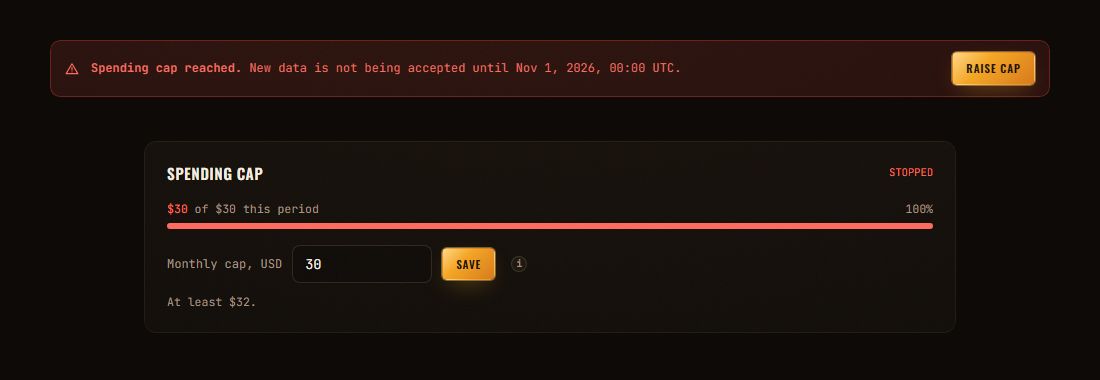
- Watch the bar. It shows this period's bill against your cap.
The cap cannot be set below what the current billing period already uses. Setting it exactly there is how you say "stop now", and the page tells you so before you save.
What happens as you get close
- At 50% and 80%: studio owners and admins get an email, once each per billing period.
- At the cap: another email, and a red banner on Billing and on every game page says until when new data is refused. Owners and admins get a Raise cap button; members are told whom to ask.
- Your invoice: never above the cap, the hosted MCP add-on included when you have it.
- Raise or remove the cap and data flows again within about a minute.
For your integration
While the cap holds, every ingest route answers HTTP 402 with the code spend_cap_reached and the time ingestion resumes. Refused data is not stored and cannot be sent later. The SDKs treat a 402 as rejected and do not retry it, so a capped game does not multiply its traffic. The details are in the Ingest API docs.
{"success": false,"error": "spend_cap_reached","message": "Spending cap reached. New data is not accepted until 2026-11-01 00:00 UTC.","resumesAt": "2026-11-01T00:00:00.000Z"}
Limits
- A sudden spike is caught within a few minutes, so a little data can land past the cap before it stops. You are still not invoiced above the cap.
- The cap is in US dollars, before tax, and counts the current billing period only.
- Studios on a custom Enterprise price have no cap setting; talk to us instead.
Pricing, including the cap, is on the pricing page. To see everything that shipped, read the changelog.